Download.In parallel.
MacGet splits every file across up to 16 chunks, learns what each host will tolerate, and resumes across restarts — a native SwiftUI app for macOS Tahoe.
$brew install --cask suryansh-codes2209/macget/macgetOr install with Homebrew — no Gatekeeper prompt. Installation guide
Not a progress bar.
A readout.
One bar creeping right looks the same over 1 connection or 16. MacGet shows you the throughput curve, the actual pieces in flight, and exactly why the engine settled on the concurrency it did.
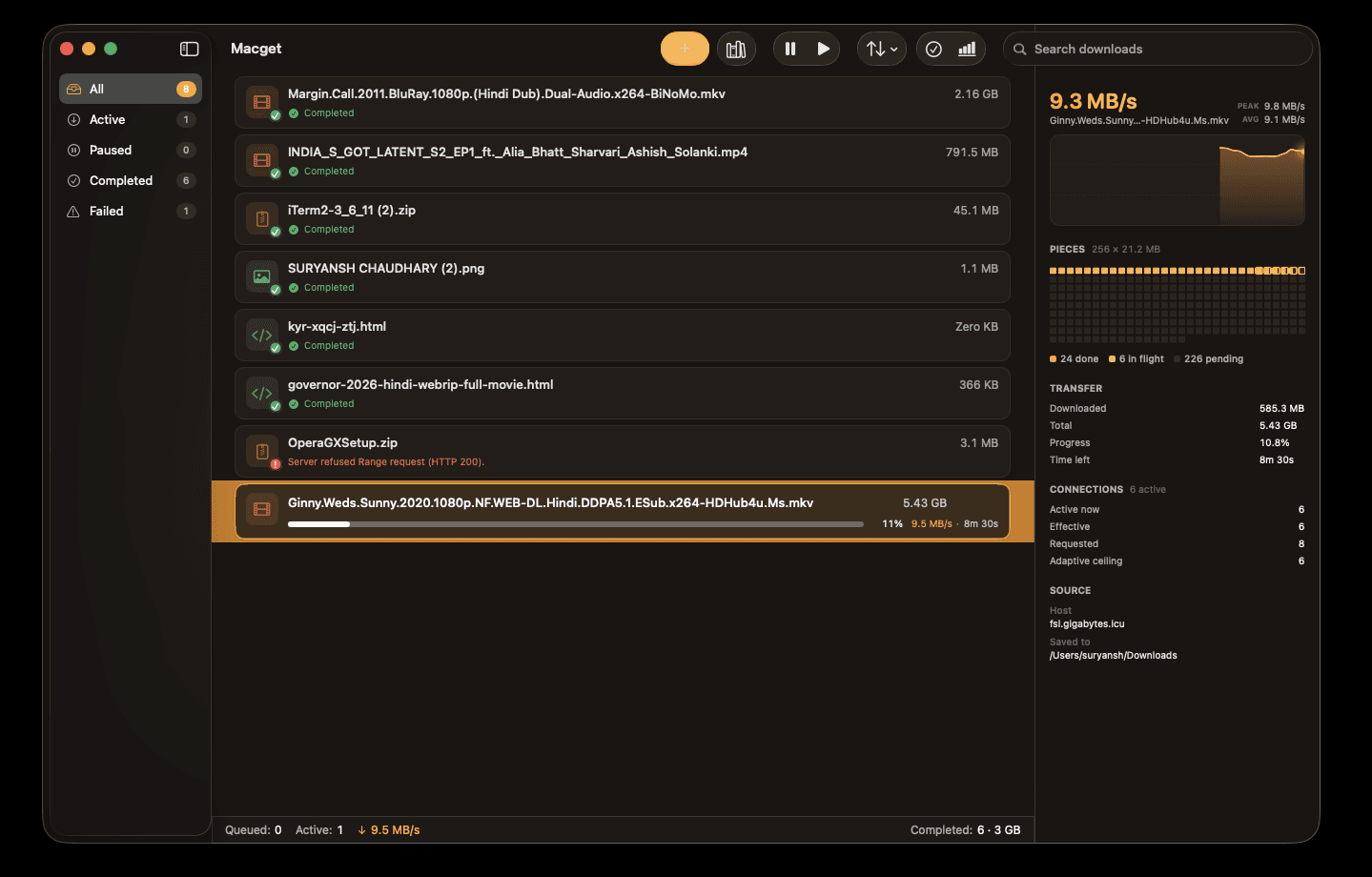
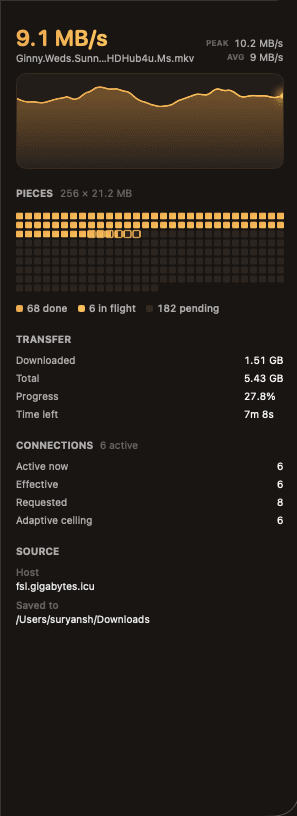
Throughput sampled at the engine's 250 ms cadence and drawn as a continuously scrolling curve, with the window's peak and average alongside. It slides between samples, so it reads as live rather than polled.
The file drawn as its real work units, in file order. Filled cells are done, outlined ones are in a worker's hands right now. Work-stealing is visible here and nowhere else — a single bar hides it completely.
Every distinct reason the worker count can sit below what you asked for, each on its own line: a cap learned from this host, a demotion after it started refusing connections, or simply your own setting. A download opens at its full count immediately — the number only comes down on evidence.
Built around how downloads
actually work.
One shared URLSession, an engine that learns each host's limits, and no background daemons, kernel extensions, or telemetry anywhere.
Up to 16 parallel chunks
HTTP-Range requests split each file across as many connections as the host allows. Work-stealing hands finished workers the next outstanding piece, so one slow chunk never holds up the file.
Watch it happen, live
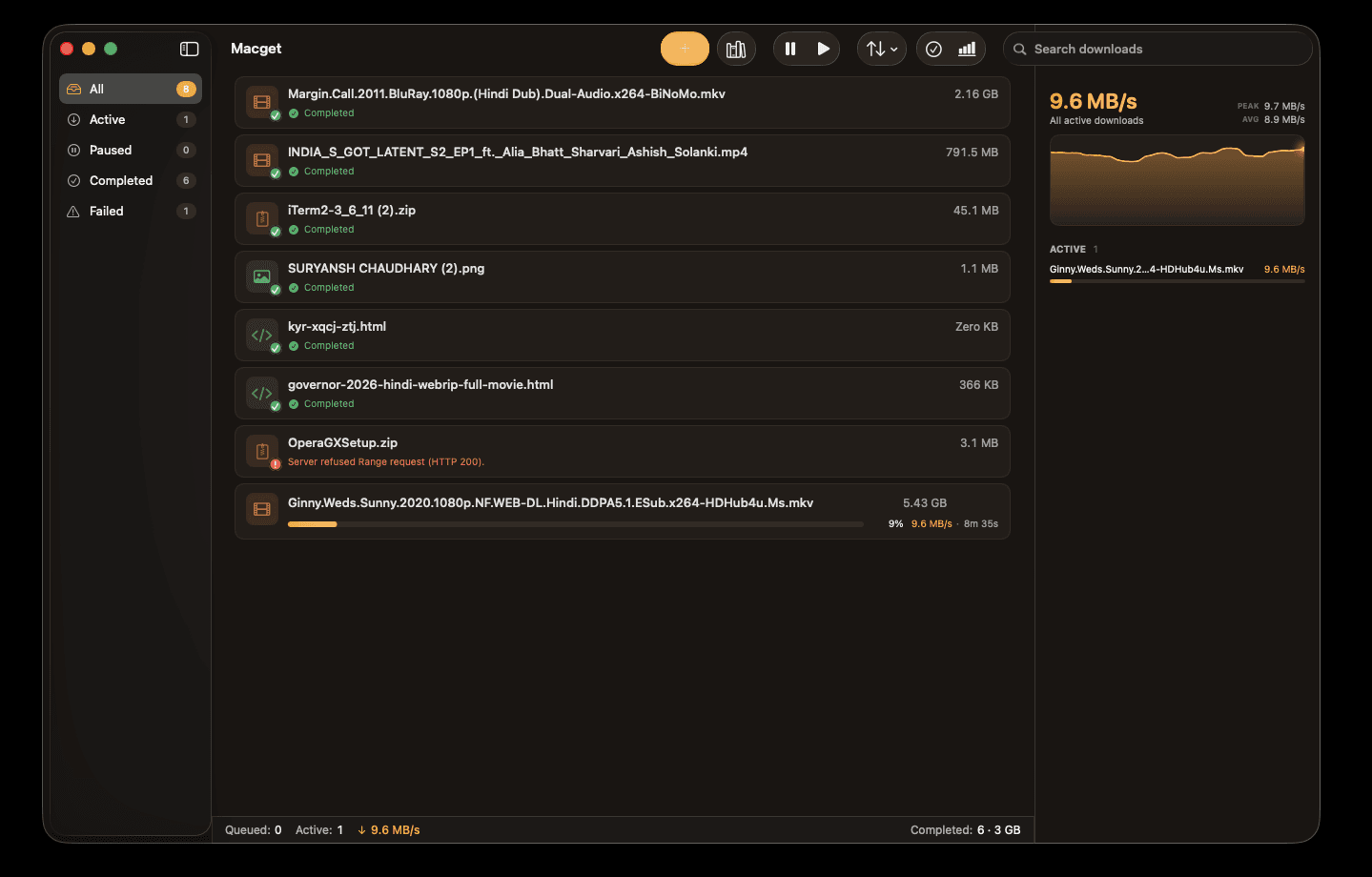
An inspector panel charts throughput over a rolling 30-second window and draws the file as its actual pieces — cells filling in file order, the ones a worker holds pulsing. One bar creeping right looks the same whether you have 1 connection or 16; this doesn't.
Adapts to throttled hosts
When a host refuses connections while the rest keep delivering, the engine halves its workers instead of hammering — and a dropped Wi-Fi link, where everything fails at once, is deliberately not counted against the server. The learned cap persists for that host for 7 days, so the next download starts smart without one bad night slowing it forever.
Resume across restarts
Per-chunk progress is persisted. Quit mid-download and reopen — it picks up where it left off. If-Range validators catch a file that changed underneath you instead of corrupting it.
Video and audio via yt-dlp
Media links route to a bundled yt-dlp + ffmpeg extractor with a quality and container picker. Opt-in — ordinary links always download as plain HTTP files.
Books from open catalogs
Browse and search Project Gutenberg and the Internet Archive without leaving the app, then send a book straight to the queue. Add any OPDS feed too — including your own Calibre server.
BitTorrent, on your terms
Magnet links and .torrent files download in the same queue as everything else. Off by default, and seeding stops at a ratio and time limit you set. MacGet never searches for or indexes torrents.
Downloads behind a login
Basic, Digest, and NTLM challenges are answered from credentials you store once. They live in the macOS Keychain, not in a config file.
Capture from your browser
A Chrome, Edge, Brave, and Firefox extension hands downloads to MacGet over local native messaging — cookies and referrer included, so logged-in downloads keep working.
Verified, not just downloaded
SHA-256 and MD5 are checked at finalize, before the partial file is promoted. A mismatch fails the download and keeps the partial rather than handing you a bad file.
Yours to schedule
Global speed cap, per-download priorities, configurable timeouts and retries, HTTP/HTTPS proxy support, and auto-sort into category folders when a download lands.
MIT licensed, zero telemetry
No analytics, no remote logging, no account. Your queue and settings never leave ~/Library/Application Support/Macget.
Your browser starts it.
MacGet finishes it.
Install the extension and downloads leave the browser's single stream for MacGet's engine — carrying the cookies and referrer that made them work, so a file behind a login stays downloadable.
Handed over with every capture
local native messaging- url
- The file's own address — not the page you were reading.
- cookie
- Scoped to that URL's domain, so a file behind a login still downloads.
- referer
- Hotlink protection sees the page you came from and lets it through.
- userAgent
- Your browser's, verbatim. The request looks the same as the one it replaces.
- filename
- The name your browser resolved, not the id sitting in the URL.
- size
- The queue shows the real total before the first byte lands.
The handoff runs over a local channel to a helper inside Macget.app. The extension contains no code that contacts a remote server — see the privacy policy.
Nothing gets lost in the handoff
The browser's own download is cancelled only after MacGet confirms it has the file. Quit MacGet, turn capture off, skip the install — the worst case is that your browser downloads it the way it always did.
Add it to your browser
Published on the Chrome Web Store — one click on Chrome, Edge, and Brave. Firefox loads it from the repository.
- Chrome
- Edge
- Brave
- Firefox
One prompt on first launch.
Then never again.
MacGet is free and not notarized — notarization needs a paid Apple Developer account. macOS will stop the first launch, and here is exactly how to get past it.
macOS will warn you once
“Macget can't be opened because Apple cannot check it for malicious software.” Expected — the build isn't notarized. Click Done.
Open Anyway
System Settings → Privacy & Security. Scroll to the message about Macget and click Open Anyway, then confirm.
That's it, forever
macOS remembers. Every later launch — and every Sparkle auto-update — opens normally with no prompt.
Prefer the terminal?
Clearing the quarantine flag skips the dialog entirely:
xattr -dr com.apple.quarantine /Applications/Macget.appProbe. Plan. Stream. Finalize.
Every download walks through the same four stages. Each one is its own actor — failure in one doesn't corrupt the others.
- 01
Probe
HEAD with a ranged-GET fallback, because some servers 405 on HEAD. Records size, ETag, Last-Modified, and whether byte ranges are honored at all.
- 02
Plan
Split into pieces of ~8 MB, up to 16 workers, each chunk at least 64 KB. Clamped to whatever cap the engine already learned for this host.
- 03
Stream
Parallel range requests over one shared URLSession, HTTP/3 where offered. Transient errors back off and retry; permanent ones fail fast instead of burning attempts.
- 04
Finalize
Verify the checksum if one was given, then move the partial into place under a unique name — and into a category folder if auto-sort is on.
Quick answers.
If something here is unclear, the docs go deeper — and the source code is always the final word.
- Most either ignore Range support, or open every connection they can and get throttled for it. MacGet discovers what each host actually tolerates at runtime and adapts, using native URLSession and persisting state properly across launches.